
The Landset Lens is the section of a Landset Property Brief that compares one home's permit history against the homes around it and highlights what's worth checking. A property can have dozens of permits on file. Some are routine. Some are worth a closer look. The Lens sorts that out by asking one question: what work have the neighbors had done that this home hasn't? It's built on Austin-area public records and ready before you write the offer.
It starts on page 2, right under the masthead, and it's the section buyers and their agents read first and remember longest. See it in the sample brief.
What the Landset Lens Does
The Lens puts a property's permit record in context. It doesn't just list what's on file. It shows how this home stacks up against its neighbors.
A single permit record on its own doesn't tell you much. But if a meaningful share of the surrounding homes have permitted under-slab drain line repairs and this property has no permit for that work, the missing record becomes a question worth asking.
That's the core of the Lens. It turns individual records into neighborhood patterns, and patterns into questions for the inspection. The data is the input. The comparison is the product.
The Three Numbers at the Top of the Brief
Page 2 of the brief opens with a masthead: the address, a map of the property and its surroundings, and three numbers.
- Permits: the total number of permits on file for the property.
- To Verify: permits on the property with an Expired, Void, Withdrawn, or still-open status in City records. Each one has its own row under Permits to Verify.
- To Check: how many items the neighborhood comparison flags. They're covered below.
The Lens header repeats the counts and adds completed work, like "1 TO VERIFY · 8 TO CHECK · 2 COMPLETED."
These three numbers give you a quick read before scrolling into the details. The Landset Lens starts right below them.
Permits to Verify
Before the neighborhood comparison, the Lens lists permits on the property's own record that show an Expired, Void, Withdrawn, or still-open status in City records. Each gets its own row, grouped by status:
- Open: issued within the last three years; no final inspection yet in City records.
- Open (Older): issued over three years ago. Permits can stay open in City records after the work is finished.
- Expired: issued; no final inspection in City records.
- Void: cancelled per City records.
- Withdrawn: withdrawn per City records.
A status alone doesn't show whether work was done, finished, or abandoned, so every row comes with questions. For open permits, the report suggests asking the seller, through your agent, whether the work is still in progress, finished, or stopped. For recent ones, it also asks whether they plan to schedule the permit's final inspection before closing. Expired and Void rows add: "Ask your inspector whether the work under this permit appears to have been done." The report suggests confirming each permit's status with Austin Development Services before closing, and searching Austin Build + Connect (abc.austintexas.gov) for records that may not appear in the report.
There are a lot of great conversations happening about permits in Austin right now. KXAN recently took a look at expired home permits in Austin, and Landset was happy to be a part of it.
To Check: What the Neighbors Have Done
This is the heart of the Lens.
To Check items are ordered by one thing: how commonly the property's closest neighbors (homes within 0.2 miles) have had the same work permitted. They are not ordered by condition, urgency, or cost, and the report says so directly. The order reflects how widespread a pattern is on the immediate blocks.
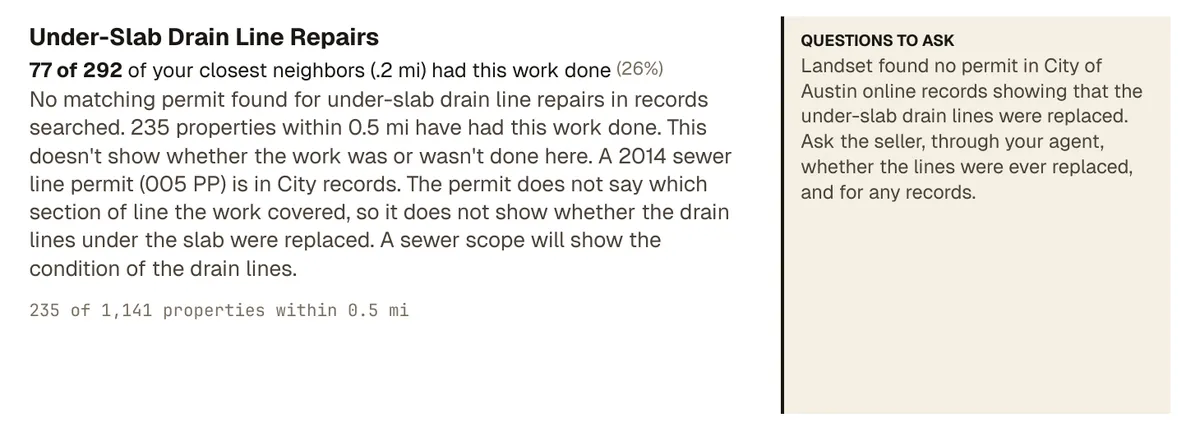
Most items read like this: "No matching permit found for under-slab drain line repairs in records searched. 11 properties within 0.5 mi have had this work done. This doesn't show whether the work was or wasn't done here." The Lens only flags a missing permit when enough nearby homes have had that work, so you aren't handed a list of every job this house hasn't needed. The bar is lower for hidden, costly problems like under-slab drain lines and higher for routine replacements like water heaters.
Each card shows the numbers behind the flag:
- A line like "5 of 23 of your closest neighbors (.2 mi) had this work done (22%)."
- A footer with the wider view, like "11 of 340 properties within 0.5 mi." The wider comparison covers every home within half a mile, however many that turns out to be.
When fewer than five homes sit in that closest circle, the percentage is dropped and the card notes the small sample. With fewer than three, it says there are too few immediate neighbors to compare. A percentage built on two houses would mislead more than it helps.
Each card ends with Questions to Ask: literal questions for your inspector, or for the seller through your agent. For example, "Ask your inspector: How old is the water heater, is it tank or tankless, and what condition is it in? The manufacture date is usually on the label."
Two honest limits. First, permit findings reflect the City of Austin online records Landset searched as of the report date. Records may be incomplete, older or archived permits may not appear, and Landset's matching and categorization may not capture every relevant permit. Second, a neighborhood pattern doesn't mean this property has the same issue. The Lens surfaces patterns. It doesn't diagnose, and it doesn't replace the inspection.
Work Completed: What's Already Documented
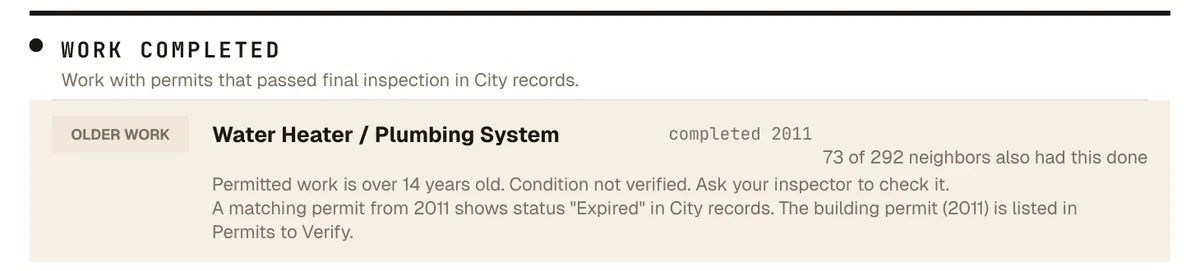
Below To Check, the Lens shows work with permits that passed final inspection in City records, for patterns that are common nearby, with how many close neighbors had the same work. A roof replacement that passed final inspection three years ago shows up here with the year it was completed.
This is also where permit age shows up. Completed work gets an Aging badge at about 60% of the system's typical life, and an Older Work badge at about 80%. Each badge states the permit's age in full years, like "Permitted work is over 8 years old." Aging rows add "Ask your inspector to check its condition and expected remaining life." Older Work rows add "Condition not verified. Ask your inspector to check it." Some rows carry an Older Permits badge instead, when the newest permit for that work is over 20 years old. That badge describes the permits, not the work. So a water heater permitted in 2011 appears here, under Work Completed, with an Older Work badge.
The lifespans the report uses for Austin are shorter than the national averages you'll see elsewhere, because Central Texas heat, sun exposure, hail, and hard water wear systems out faster:
- Composition shingle roof: 17 years
- Heating, ventilation, and air conditioning (HVAC): 12 years
- Water heater: 8 years
- Electrical panel: 30 years
A badge reflects the age of the permit, not the condition of the system. Condition is a question for the inspector.
It's easy to focus only on the open questions about a house. Seeing what's already documented balances the picture.
Why the Neighborhood Comparison Matters
The comparison is what makes the Lens different from a simple permit lookup.
Looking up one property's permits from the City of Austin is the easy part. What's hard to do by hand is cross-reference that record against every home within half a mile and see which patterns stand out. That comparison is what turns raw records into something you can act on.
Here's an example. Say a property has no foundation stabilization on its permit record. On its own, that's neutral. Most homes haven't needed foundation work. But if 6 of its closest neighbors have permitted foundation work, and 15 homes within half a mile have too, the missing record reads differently. It's not a red flag. It's a question worth raising with the inspector.
You can also run it the other way. If this home has a recent permitted foundation repair and the Lens shows little foundation activity nearby, that repair may be more isolated than typical for the area. The report doesn't label any repair as a one-off or a trend. It points out patterns in the permit records for this home and the homes around it. Raise what you see with your inspector.
Context changes interpretation. The Lens provides the context.
How to Use the Lens
Whether you're buying the home or representing the buyer, the Lens gives you three things at once.
Transparency. You see what the public records show before the offer is written: permits to verify, what the neighbors have had done, what's already been completed, and which permits are older. Buyers go in knowing what's on file. Agents can walk their clients through it, which builds trust and sets expectations early.
Better questions. If the Lens shows a heating and air conditioning permit with an Older Work badge and a neighborhood pattern of replacements, that's a specific question to bring to the inspector and, through your agent, to the seller. A pattern next door doesn't mean this house has the issue. It means it's worth asking.
Direction. Instead of walking in cold, the inspector walks in with a list of specific systems to look at, each with the neighborhood numbers behind it.
Get Report →The hard part is the comparison. Landset checks this home's permit record against every home within half a mile. City permit records weren't written to be compared: the same job can be described many different ways, so Landset first matches each record to a type of work. Then it measures how common each type of work is on the surrounding blocks. The patterns that stand out become specific questions for your inspector, all in one brief before you write the offer. The records are public. The analysis is what Landset adds. If you work with buyers in Austin, see how agents use Landset.